Write, publish and sign a recipe
Ce contenu n’est pas encore disponible dans votre langue.
This page is the authoring path, in order: write, learn from the examples, validate, publish, sign. The format is normative on the recipe-spec site and in the specification; what follows shows the way and links there for every rule. If the vocabulary (draft, cooked, cookbook) is new, start with Recipes, cookbooks and retrievers.
A minimal recipe
Section titled “A minimal recipe”apiVersion: recipe.tobby.dev/v1alpha1 # the schema version (spec §4)kind: Recipemetadata: name: hello # becomes the cookbook repository name (spec §11.3) version: 1.0.0 # version of the application — becomes the OCI tagspec: ingredients: - name: hello kind: ContainerImage ref: docker.io/library/hello-world # always fully qualified — no default registry version: linux # exact tag; a draft may use a constraint platforms: ["linux/amd64"] # a cooked recipe adds: digest: sha256:…Three rules save the most round-trips:
refis host and repository only — no tag, no digest, no scheme. Version and digest have their own fields so tools can validate and resolve them independently.- Unknown fields are rejected, not ignored: a misspelled
digset:must not silently weaken pinning. Extension data goes inmetadata.annotations. metadata.nameandmetadata.versionare not decoration: publication refuses a recipe whose content disagrees with the reference it is pushed to.
The full grammar — metadata fields, the four ingredient kinds and their kind-specific fields, constraint syntax — is in the specification (document structure, the Recipe kind, ingredient kinds), with published JSON Schemas any editor or CI can validate against.
Learn from the examples
Section titled “Learn from the examples”The repository ships six annotated documents under
examples/,
written to be read as much as run: each carries the reasoning that produced
its ingredient list, because that reasoning is the hard part. All were
verified against live upstreams and lint clean.
| File | What it teaches |
|---|---|
otel-collector.yaml |
The nominal case — and a chart that renders no image by default. |
keycloak.yaml |
A dependency the chart never mentions, and platform labels that are not what you would type. |
victoria-metrics-operator.yaml |
An operator that carries its images in its own defaults. Read this one. |
harbor.yaml |
Single-architecture images, and mutable data that must not be pinned. |
metallb.yaml |
A chart that is not an OCI artifact, and a sidecar on its own release cadence. |
retriever.yaml |
The desired state of one zone, with version constraints per stability need. |
The problem these examples circle is always the same one: knowing which
container images a Helm chart will need, on the other side, once the door
is shut. The reflex answer — helm template | grep image: — is a good
start and is not sufficient. Four ways an image escapes it, one per
example:
- The chart renders nothing. The OpenTelemetry Collector chart ships
image.repository: ""and refuses to choose a distribution for you; rendering the defaults yields an empty inventory. Inventory the manifests rendered from your values, never the chart’s defaults. - The chart assumes something already exists. Keycloak renders exactly one image and requires a PostgreSQL it never mentions. A rendered inventory tells you what a chart deploys, never what it depends on — read the values and the README for external dependencies.
- The operator carries its images somewhere else entirely. Render the
VictoriaMetrics operator chart and you get one image; the ~25 images it
actually deploys are compiled into its binary as defaults. Ask the
operator (
--printDefaults), its CRD defaults, or its documentation — before the zone is sealed, not after. - The chart is not an OCI artifact at all. MetalLB and Harbor publish
charts only to legacy
index.yamlrepositories, which the format takes out of scope on purpose. Republish the chart once into a registry you control; the archive is not rewritten, so upstream signatures survive.
The examples README develops each case, plus three lessons usually learned the expensive way: platform labels are matched exactly, not everything multi-platform is multi-platform, and mutable data (a vulnerability database, for instance) belongs in its own recipe on its own cadence.
Validate with recipe lint
Section titled “Validate with recipe lint”The linter belongs to the specification, not to Tobby — validation is the same for every implementation, and an authoring machine does not need a Tobby instance:
go install github.com/tobby-fetch/recipe-spec/cmd/recipe@latest
recipe lint examples/                     # draft profile (the default)recipe lint --profile cooked recipe.yaml  # publishable? digests + exact tagsrecipe lint --output json recipes/        # machine-readable, for CI
Exit code 0 means every document is valid; 1 means findings; 2 means a usage or I/O error — CI-friendly by construction. Full usage lives in the spec repository.
Publish with tobby recipe push
Section titled “Publish with tobby recipe push”tobby recipe push harbor.yaml registry.example.com/cookbook/harbor:2.15.2Any OCI push tool can publish a recipe — that is the point of the format — and the spec site documents that generic path in Publishing recipes with standard OCI tooling. What the subcommand adds is refusing to publish something a zone will reject later. The publication is refused when:
- the document is not a valid
Recipe; - it is not fully pinned — a cookbook holds cooked recipes only, every ingredient with an exact tag and a digest;
- its
metadata.nameormetadata.versioncontradicts the reference it is being published under; - the tag already exists with different content — a published recipe version is immutable. Publishing the same document twice is a no-op, not a conflict.
The command composes into a signing pipeline: human feedback goes to
stderr, the published digest alone goes to stdout. It takes the shared
configuration flags (--config, --proxy-url, …), reads registry
credentials from the configured credentials file,
and enforces the instance’s registry allowlist
like every other outbound write. Refusals carry the same stable
TBY-* error codes as the rest of Tobby.
Publish from the interface
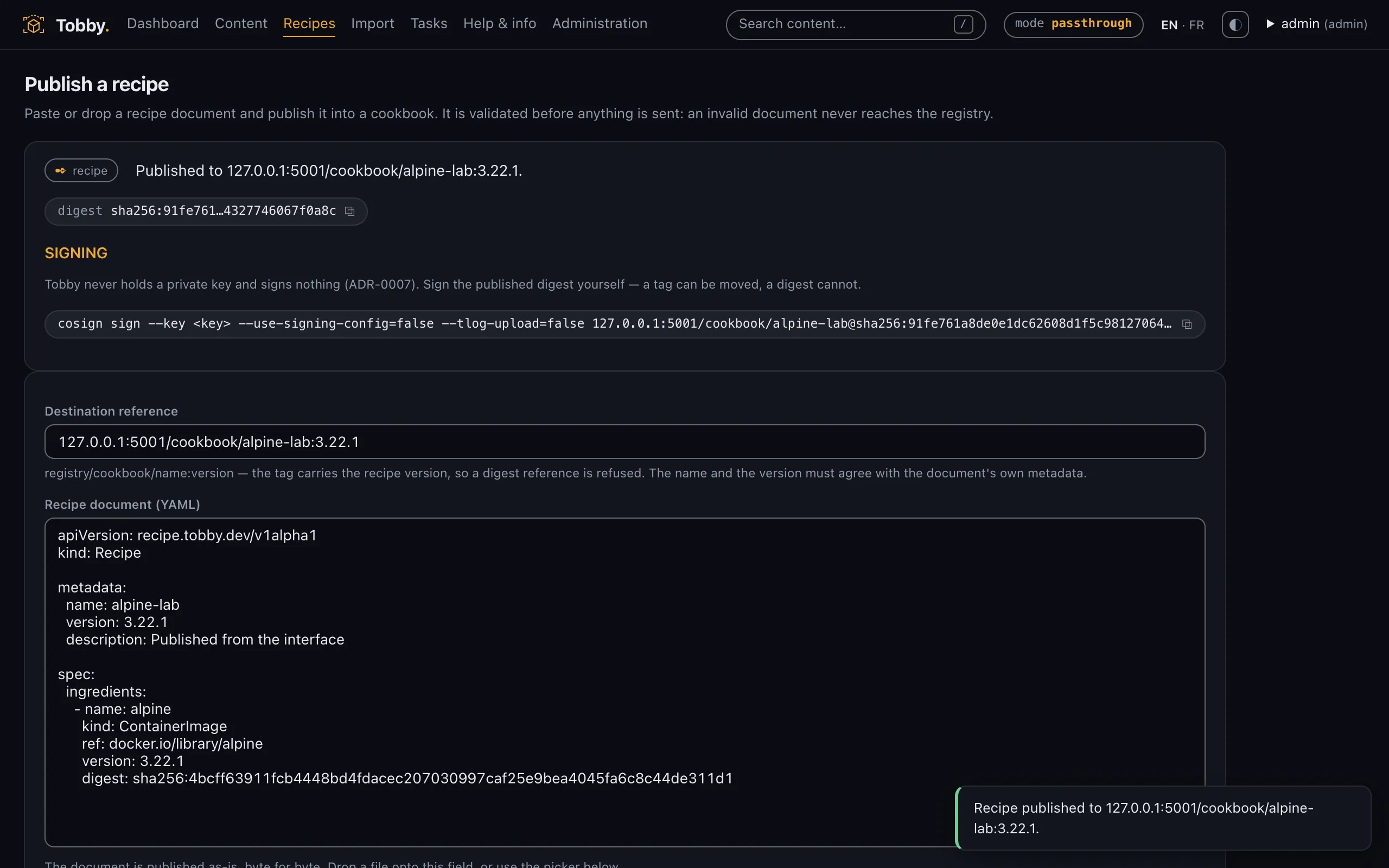
Section titled “Publish from the interface”Since v0.4, the Publish a recipe screen is the interface counterpart of
tobby recipe push: paste a recipe document — or drop it as a file — name
the destination reference, and publish. Validation is identical by
construction (both paths go through the same engine and the same
recipe-spec SDK), so the screen refuses exactly what the subcommand
refuses, with the same error codes. On success it shows the published
digest and the exact cosign sign command to run next, and states plainly
what Tobby did not do: Tobby holds no private key and signs nothing.
The screen is operator-gated — publishing writes into a registry — and every attempt is audited, succeed or fail. On an instance started without a publishing destination, the form is shown inert rather than accepting a submission that could not go anywhere.
Sign with cosign
Section titled “Sign with cosign”Signing stays outside Tobby, which never holds a private key: publishing produces an unsigned artifact and you sign the digest yourself. With cosign 3.x and a key pair:
DIGEST=$(tobby recipe push harbor.yaml registry.example.com/cookbook/harbor:2.15.2)
cosign sign --key cosign.key \  --use-signing-config=false --tlog-upload=false \  "registry.example.com/cookbook/harbor@${DIGEST}"
Two things in that command are non-negotiable for restricted zones:
- Sign the digest, never the tag. A tag can be re-pointed; the digest is the content. This is why the push command prints the digest.
- Keep the transparency log out of it. A plain
cosign sign --key …on cosign 3.x uploads the signature to the public Rekor log — a network call a restricted-zone signer must not make, and a lookup an air-gapped verifier cannot perform.--use-signing-config=false --tlog-upload=falsekeeps the signature verifiable fully offline. Verification then needs only the public key:cosign verify --key cosign.pub --insecure-ignore-tlog=true …— the flag only skips the Rekor check this model deliberately does not use.
The signature lands in the same repository as the recipe, in either layout
cosign produces (attached .sig or Sigstore bundle); consumers accept
both, so the choice stays with whoever signs. The signing model, transport
layouts, and consumer duties are normative in the specification’s
signing and verification
section, with a step-by-step in the
publishing guide.
How the consuming Tobby instance is given the public keys — trust roots,
scopes, rotation with overlap — is on
Signatures, trust roots and allowlist.
The recipe.yaml title convention
Section titled “The recipe.yaml title convention”A published recipe artifact carries its YAML as a single layer, and the
specification’s
artifact layout
takes a deliberate position on that layer’s
org.opencontainers.image.title annotation: publishers SHOULD set it
to recipe.yaml, so that a generic oras pull writes a sensibly named
file; consumers MUST NOT depend on it, and must not reject an artifact
over its value or its absence — generic tooling writes whatever file name
it was handed, and the format promises that generic tooling participates.
In practice: tobby recipe push sets it for you; when publishing with
oras push, name the file recipe.yaml before pushing. On the consuming
side, Tobby follows the MUST NOT — it identifies a recipe by its artifact
type and layout, never by the title.