Enterprise network: proxy, PKI, TLS
A passthrough instance usually lives in a segmented zone where direct egress is dropped, not refused: a misconfigured fetch does not fail, it hangs until its deadline. Tobby is built for that environment. It has one outbound transport, shared by every path that leaves the process — the recipe engine, one-off imports, Helm chart repositories, the Retriever document, trust roots fetched by URL, and pushes to the destination. Configure it once and every path uses it; a test in the suite proves no outbound path bypasses it (FR-080).
Authenticated proxy
Section titled “Authenticated proxy”network: proxy: url: http://proxy.example.com:3128 noProxy: - .internal.example.com - 10.0.0.0/8 username: tobbynetwork.proxy.url— the forward proxy. Anhttps://proxy is accepted; the hop to the proxy is then itself TLS, verified like any other connection.--proxy-urlexists as a flag for the URL.network.proxy.httpsURL— only whenhttps://destinations take a different route; empty meansurlserves both.network.proxy.noProxy— destinations reached directly: a host, a.suffix, a CIDR block, or*. The zone registry and the instance’s own loopback usually belong here.
The password never goes on a command line. There is deliberately no
flag for it — a flag value is readable in the process table and in shell
history (NFR-015). It arrives through the configuration file
(network.proxy.password) or the environment:
# Kubernetes: from a Secret you already manageenv: - name: TOBBY_NETWORK_PROXY_PASSWORD valueFrom: secretKeyRef: {name: tobby-proxy, key: password}However it arrives, it is redacted in every log record, in error
messages, and in tobby config dump — the redaction is a property of
the type that holds the secret, not of the code that prints it.
Private certificate authorities — without disabling TLS
Section titled “Private certificate authorities — without disabling TLS”A registry or proxy behind an internal PKI becomes reachable by adding its authority to the outbound trust store (FR-081):
network: tls: caFiles: - /etc/tobby-ca/internal-root.pemnetwork.tls.caFiles— paths to PEM bundles.network.tls.ca— the same, inline, for deployments that inject configuration but cannot mount a file.network.tls.exclusiveTrust— drops the host’s public root store, leaving only your authorities. It only ever narrows trust.
There is no setting anywhere in Tobby that disables certificate
verification. FR-081 asks for private authorities to be trusted, not
for the check to be dropped — a private CA still authenticates the peer;
a disabled check authenticates nothing. The neighbouring
registries.insecure answers a different question (“this named host
speaks plain HTTP”), stays per-host and explicit, and becomes
unnecessary once the authority is configured.
The same trust store serves every outbound edge: registries, chart repositories, the Retriever source, trust-root URLs, and the TLS hop to the proxy itself.
Server TLS: what the instance presents
Section titled “Server TLS: what the instance presents”One listener carries the UI, the API, and the embedded registry, so one
certificate covers all three — no surface can be left in the clear by
accident (FR-082). Behind an ingress or reverse proxy that terminates
TLS you can leave this off; set server.secureCookies: true there so
session cookies are marked Secure even though the listener sees plain
HTTP. When nothing terminates in front, the instance serves TLS itself.
With a certificate you provide
Section titled “With a certificate you provide”server: tls: certFile: /etc/tobby-tls/tls.crt keyFile: /etc/tobby-tls/tls.keySupplying the pair implies enabling. The files are re-read whenever they
change on disk, so rotation (cert-manager replacing a mounted Secret, a
cron dropping a renewed pair) is picked up on the next handshake without
a restart. The flags --tls-cert-file / --tls-key-file are
equivalent.
Self-signed fallback, with a logged fingerprint
Section titled “Self-signed fallback, with a logged fingerprint”With server.tls.enabled: true and no pair, Tobby generates a
self-signed certificate — issued for the loopback names, the machine’s
hostname, and any names listed in server.tls.hosts — and logs its
SHA-256 fingerprint at startup:
{"level":"info","msg":"serving TLS","self_signed":true, "fingerprint_sha256":"A1:B2:…","requirement":"FR-082"}Distribute that fingerprint out of band and compare it against what the
client saw before trusting it. The generated pair is persisted under
state.root/tls/, so the fingerprint survives restarts: an operator who
pinned it stays right.
Replacing the served certificate from the interface
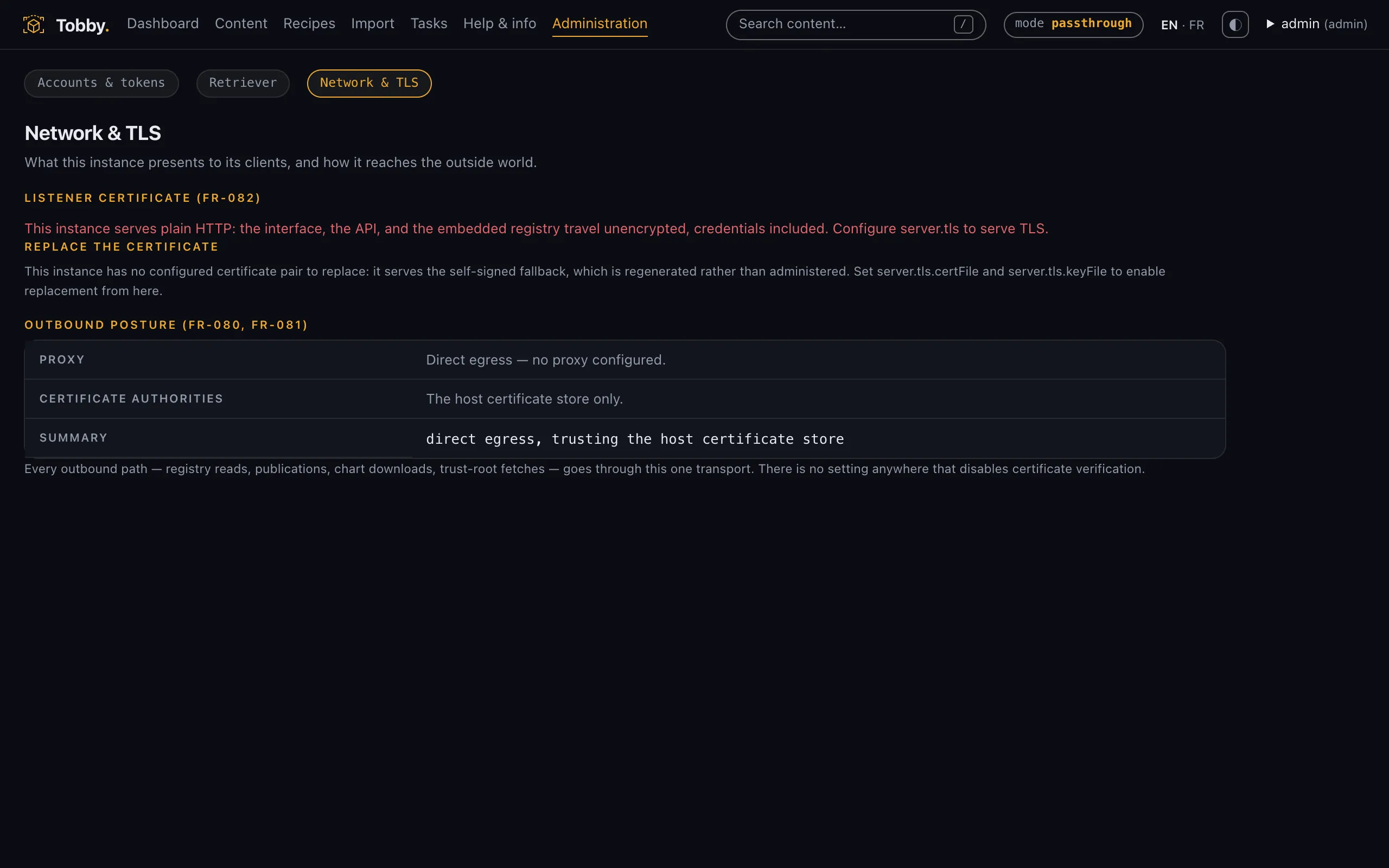
Section titled “Replacing the served certificate from the interface”The Network administration screen (/admin/network, admin role;
mirrored by GET /api/v1/network and PUT /api/v1/network/certificate)
shows what the listener actually presents — fingerprint, SANs, validity —
and flags a self-signed fallback as the degraded posture it is.
Replacement takes files, never pasted text fields, and the private key
is returned in no form at all — not its bytes, not its length, not a
digest. The screen re-reads the served pair after writing: what it
confirms is what the listener adopted, not what was submitted.
An instance that started on the generated fallback has no configured certificate path to overwrite. Since v0.4.1 the screen offers a destination inside the state directory — the only place a private key may live — beside the generated pair rather than over it, and adoption is an explicit step separate from writing the files. Every replacement, and every refused attempt, is audited with the certificate fingerprint as its target (FR-094).
Next: give the instance something to promote — the zone Retriever and the cascade.