Your first promotion
Step 2 of 2 — you have a running instance from
step 1. This page puts it in its real place:
between the registries where content already lives and the zone that
consumes it. You will pin one public image in a recipe, sign the recipe,
publish it to a cookbook, declare the zone’s desired state, let your
instance promote it — and finish with a docker pull from the zone
registry. Everything below uses ordinary user tooling — nothing from the
source tree.
You need: the tobby binary and the tobby.yaml from step 1, plus
docker, cosign and curl. The image comes from Docker Hub; the only
thing you stand up yourself is a throwaway cookbook registry on loopback.
The cast
Section titled “The cast”| Piece | Role |
|---|---|
docker.io |
The upstream registry. The image already lives there; nothing is pushed to it. |
A cookbook registry (:5001) |
An ordinary OCI registry holding your signed recipe. Any registry you can push to works — here, a throwaway local one. |
Your instance (:8080) |
The one from step 1: secured, with a trust key and a Retriever. It does the promoting. |
A cosign key pair |
Signs the recipe. The public key becomes your instance’s trust root. |
1. A cookbook registry
Section titled “1. A cookbook registry”Recipes are published into a cookbook: an ordinary OCI repository, on any registry you can push to. If you already have one (ghcr.io, Harbor, …), use it and adapt the addresses below. For the walkthrough, a throwaway registry on loopback does fine:
docker run -d --rm --name cookbook -p 5001:5000 registry:2The host port is 5001, not 5000: on macOS the AirPlay receiver squats port 5000 and answers 403 in the registry’s place — a classic trap of local-registry tutorials.
2. Pin the image
Section titled “2. Pin the image”A recipe names content by digest, never just by tag. Read the digest that
alpine:3.22.1 resolves to today:
docker buildx imagetools inspect docker.io/library/alpine:3.22.1The first lines print Digest: sha256:… — keep that digest, the
recipe pins it.
3. Write the recipe
Section titled “3. Write the recipe”A recipe describes one coherent delivery. A cooked recipe — the only
kind a cookbook publishes — pins every ingredient by digest, so one
signature attests the exact bytes of the whole delivery. Write
alpine.yaml, with the digest from the previous step:
apiVersion: recipe.tobby.dev/v1alpha1kind: Recipe
metadata:  name: alpine  version: 3.22.1  description: First promotion — one pinned image
spec:  ingredients:    - name: alpine      kind: ContainerImage      ref: docker.io/library/alpine   # nominal reference, no tag      version: 3.22.1      digest: sha256:<the digest imagetools printed>
Concepts — recipes, cookbooks, retrievers — are covered in Understand recipes.
4. Publish and sign it
Section titled “4. Publish and sign it”tobby recipe push publishes the recipe as an OCI artifact after checking
it: a document that is not a valid recipe, not fully pinned, or already
published with different content is refused. The throwaway registry
speaks plain HTTP, which needs an explicit per-host opt-in:
export TOBBY_REGISTRIES_INSECURE=127.0.0.1:5001tobby recipe push alpine.yaml 127.0.0.1:5001/cookbook/alpine:3.22.1The published digest goes to stdout, ready for signing. Signing stays outside Tobby — it never holds a private key:
cosign generate-key-paircosign sign --key cosign.key --yes --allow-insecure-registry \ --use-signing-config=false --tlog-upload=false \ "127.0.0.1:5001/cookbook/alpine@<the digest recipe push printed>"The two flags --use-signing-config=false --tlog-upload=false keep the
signature verifiable offline: without them, cosign 3.x publishes to the
public transparency log — a network call a restricted-zone signer should
not make, and a lookup the destination could not perform anyway.
5. Declare the zone’s desired state
Section titled “5. Declare the zone’s desired state”A Retriever names what the zone should contain. Write retriever.yaml:
apiVersion: recipe.tobby.dev/v1alpha1kind: Retriever
metadata:  name: demo-zone
spec:  cookbook: 127.0.0.1:5001/cookbook  recipes:    - name: alpine      version: "3.22.1"
An exact version is taken at its word; version constraints (6.x,
~0.16.1) resolve against the cookbook at each synchronization, so a
patch release lands by publishing it — no file to edit.
6. Point your instance at it
Section titled “6. Point your instance at it”Stop the instance from step 1 with Ctrl-C — shutdown is graceful — and
add three things to its tobby.yaml: the Retriever, the trust root, and
the plain-HTTP opt-in for the throwaway registry:
retriever:  source: ./retriever.yaml   # a file, an https:// URL, or an OCI reference
trust:  roots:    - name: demo-signing-key      keyFile: ./cosign.pub
registries:  insecure: ["127.0.0.1:5001"]
Then restart:
tobby serve --config ./tobby.yaml7. Promote
Section titled “7. Promote”In passthrough mode the instance reconciles on its own schedule (every 15 minutes by default). Trigger a cycle now instead: the Recipes screen has a synchronize action, or from the command line:
curl -u admin -X POST http://localhost:8080/api/v1/syncWatch the Tasks screen: the synchronization resolves the Retriever,
fetches the recipe from the cookbook, verifies its cosign signature
against your trust root, then pulls the image straight from docker.io
and checks it against the pinned digest — transferring only what the zone
is missing. The Recipes screen then shows the recipe, its resolved
version and its verification verdict.
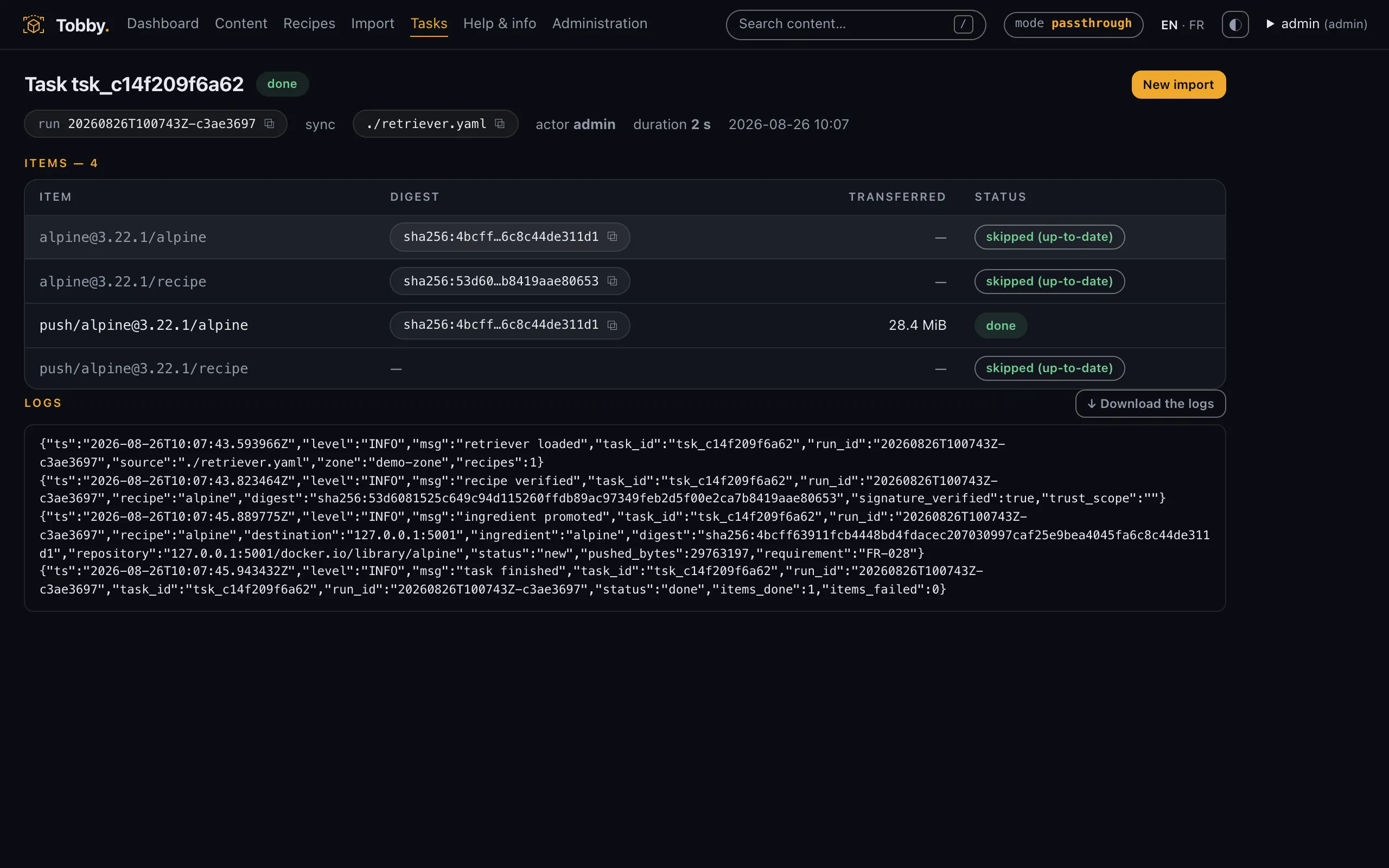
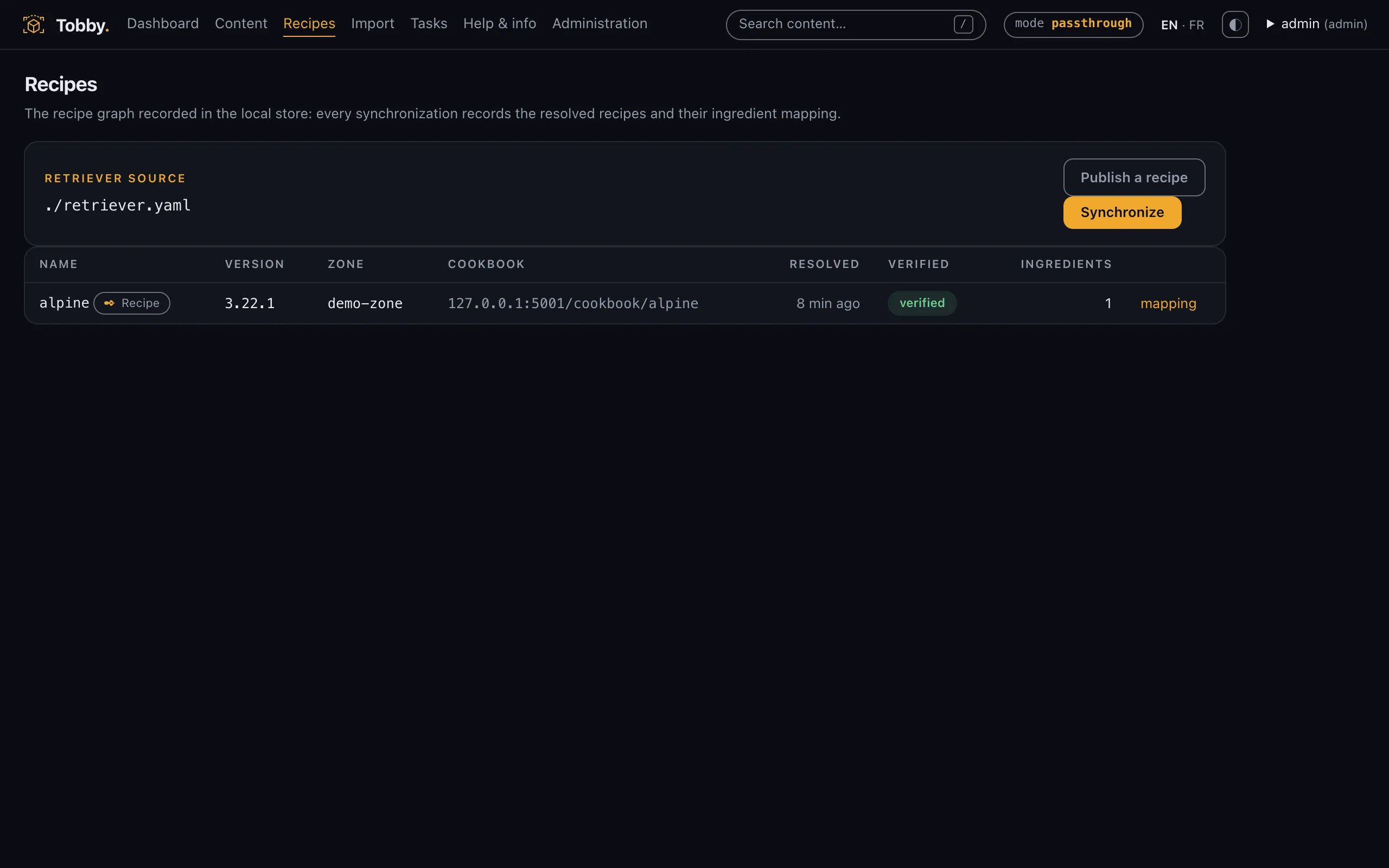
Re-run the sync: it completes without transferring anything — the zone already matches its desired state.
8. Pull from the zone registry
Section titled “8. Pull from the zone registry”Your instance’s embedded registry now serves the promoted content. Docker authenticates with the same account the interface uses:
docker login 127.0.0.1:8080 # the account created by quickstartdocker pull 127.0.0.1:8080/docker.io/library/alpine:3.22.1If your Docker daemon runs inside a VM (Rancher Desktop, some Colima
setups), its 127.0.0.1 is the VM, not your machine — use your host’s
LAN address in both commands instead.
The pull succeeds, digest intact: the image was carried, verified, and served — never rewritten, never re-signed. The path spells out where the content came from; why that matters, and how to wire real clients (containerd mirrors, GitOps), is in Connect your clients.
What you just did
Section titled “What you just did”The stage was small, but nothing was simulated: a signed recipe in a cookbook, a zone declaring its desired state, a promotion that verifies everything before serving it. Production only changes the addresses — the cookbook moves to a registry your qualification process publishes to, the Retriever is published as an OCI artifact, the keys come from that same process.
Where next
Section titled “Where next”- Connected zones (passthrough) — the delivered use case, run for real: architecture and continuous promotion, then Deploy on Kubernetes or a VM.
- Isolated zones (air-gap) — the same promotion carried on removable media: the media journey.
- Write your own recipes — the reasoning behind an ingredient list, and the pitfalls: write, publish and sign.
- Security reader? — the model behind what you just watched, on one page: the security one-pager.